


Exploring the intricacies of documenting complex legacy workflows with UiPath Task Capture best practices sets the stage for improved efficiency and compliance. Dive into this guide for valuable insights on streamlining your documentation process.
The following paragraphs delve deeper into the essentials of legacy workflow documentation and how UiPath Task Capture revolutionizes this practice.
Best Practices for Legacy Workflows Documentation
Legacy workflows are often complex systems that have been in place for a long time, making them challenging to document accurately. These workflows may have evolved over time, with various dependencies and interconnections that need to be understood for effective documentation.
Documenting complex legacy workflows is crucial for process improvement as it provides a clear understanding of how the current processes work. This documentation helps in identifying inefficiencies, redundancies, and areas for optimization, leading to more streamlined and efficient workflows.
Identifying Key Components of Legacy Workflows
When documenting complex legacy workflows, it is essential to identify the key components that make up the entire process. This includes understanding the inputs, outputs, decision points, dependencies, and any exceptions that may occur during the workflow.
- Start by mapping out the workflow steps in a visual format to get a high-level overview of the process.
- Identify any manual interventions, automated tasks, or integrations with other systems that are part of the workflow.
- Document the data inputs and outputs at each step to understand the flow of information within the process.
- Consider any exception handling scenarios or error paths that need to be documented for a comprehensive view of the workflow.
Significance of Documentation for Compliance and Auditing
Documenting legacy workflows is not only important for process improvement but also for compliance and auditing purposes. Having a clear and detailed documentation of the workflows ensures that the processes are in line with regulatory requirements and industry standards.
Accurate documentation of legacy workflows provides transparency and traceability, making it easier to demonstrate compliance during audits.
- Ensure that all steps, decisions, and data flows are documented accurately to maintain compliance with regulations and standards.
- Regularly update the documentation to reflect any changes or updates in the workflow to ensure compliance with the latest requirements.
- Use version control and change management processes to track any modifications made to the workflows and ensure a complete audit trail.
- Train personnel on the importance of following documented procedures to maintain compliance and facilitate auditing processes.
Utilizing UiPath Task Capture for Documentation
UiPath Task Capture is a powerful tool designed to streamline the documentation process for complex workflows, especially those involving legacy systems. Let's explore how this tool can help you efficiently document your workflows.
Features and Capabilities of UiPath Task Capture
UiPath Task Capture offers the following features and capabilities:
- Automatic Workflow Documentation: Task Capture automatically captures all the steps performed during a workflow, eliminating the need for manual documentation.
- Screen Recording: Users can record their screen while performing tasks, providing a visual representation of each step in the workflow.
- Annotation and Comments: Users can add annotations and comments to the captured steps, providing additional context for each task.
- Integration with UiPath Studio: Task Capture seamlessly integrates with UiPath Studio, allowing users to import documented workflows directly into their automation projects.
Comparison with Traditional Documentation Methods
When compared to traditional documentation methods for legacy workflows, UiPath Task Capture offers several advantages:
- Time Efficiency: Task Capture automates the documentation process, saving time and effort required for manual documentation.
- Accuracy: By capturing tasks in real-time, Task Capture ensures accurate documentation of complex workflows.
- Collaboration: Task Capture allows for easy sharing and collaboration on documented workflows, facilitating communication among team members.
Using UiPath Task Capture Effectively
Here are step-by-step instructions on how to effectively use UiPath Task Capture:
- Open Task Capture and start a new recording session.
- Perform the tasks within your legacy workflow while Task Capture captures each step.
- Add annotations, comments, and screenshots to provide additional context to the captured steps.
- Stop the recording session and save the documented workflow for future reference or integration with UiPath Studio.
Streamlining Documentation Process with UiPath Task Capture
Here are examples of how UiPath Task Capture streamlines the documentation process for complex legacy workflows:
- By automatically capturing all steps in a workflow, Task Capture eliminates the need for manual documentation, saving time and resources.
- The ability to add annotations and comments allows for a more detailed and informative documentation of each task, enhancing clarity and understanding.
- Integration with UiPath Studio enables seamless transfer of documented workflows into automation projects, ensuring a smooth transition from documentation to implementation.
Strategies for Handling Complexity in Legacy Workflows
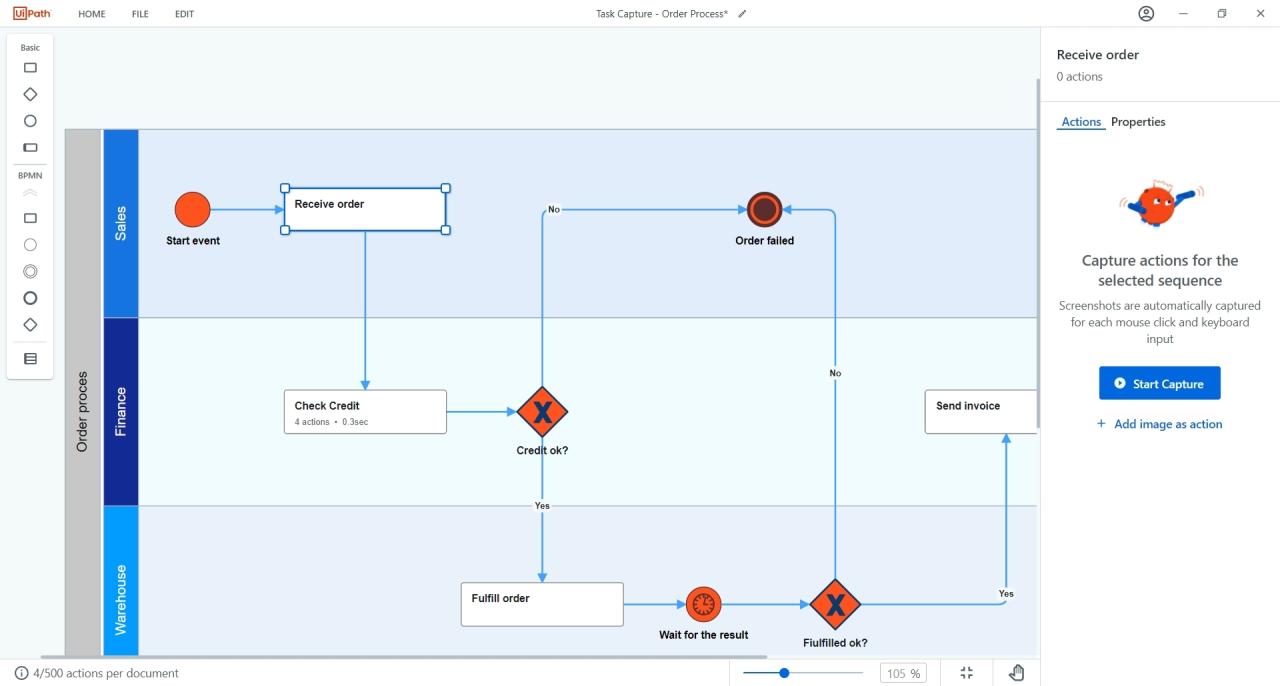 When dealing with complex legacy workflows, it is crucial to have a systematic approach in place to ensure accurate documentation and successful automation. Here, we will discuss some strategies for handling complexity in legacy workflows.
Breaking Down Complex Legacy Workflows
- Start by identifying the main components of the workflow and breaking it down into smaller, more manageable tasks.
- Document each step clearly, including inputs, outputs, and dependencies, to understand the flow of the workflow.
- Use flowcharts or process diagrams to visualize the workflow and identify areas that may need simplification or optimization.
Dealing with Branching Logic and Conditional Paths
- Understand the decision points in the workflow and document the conditions that lead to different paths.
- Create separate documentation for each branch to clearly Artikel the logic and steps involved.
- Use decision tables or logic diagrams to represent branching logic and ensure all possible scenarios are accounted for.
Ensuring Accuracy and Completeness
- Verify the documentation by testing the workflow to ensure that all steps are accurately captured.
- Engage with stakeholders and subject matter experts to validate the documentation and address any discrepancies or missing information.
- Regularly review and update the documentation as the workflow evolves or changes over time.
Incorporating Best Practices into UiPath Task Capture
When it comes to documenting complex legacy workflows, customizing UiPath Task Capture is essential to meet specific documentation needs. Here are some tips to incorporate best practices into UiPath Task Capture:
Customizing UiPath Task Capture for Specific Needs
- Define custom fields and tags to categorize different workflow steps based on their nature or importance.
- Create templates for common workflow patterns to streamline the documentation process and ensure consistency.
- Utilize naming conventions and color codes to easily identify and differentiate between different types of tasks.
Integration with Other UiPath Products
- Integrate UiPath Task Capture with UiPath Studio to generate automation workflows directly from documented processes.
- Use UiPath Orchestrator to schedule and monitor the execution of automated workflows created from Task Capture recordings.
- Leverage UiPath Automation Hub to manage and prioritize automation projects based on the documented legacy workflows.
Structuring and Organizing Documentation in UiPath Task Capture
- Group related tasks into logical sequences to represent the flow of the legacy workflow accurately.
- Create hierarchies and dependencies between tasks to visualize the relationships and dependencies within the workflow.
- Add annotations and comments to provide context and additional information for each task recorded in UiPath Task Capture.
Standardizing Documentation Practices for Legacy Workflows
- Establish company-wide guidelines for documenting legacy workflows using UiPath Task Capture to ensure consistency and quality across all projects.
- Train team members on best practices for capturing, organizing, and annotating tasks in UiPath Task Capture to maintain a standardized approach.
- Regularly review and update documentation templates and standards based on feedback and evolving workflow requirements to improve efficiency and accuracy.
Final Summary
In conclusion, mastering UiPath Task Capture best practices for documenting complex legacy workflows is key to enhancing operational transparency and compliance. Embrace these strategies to elevate your workflow documentation process.
FAQ Section
What are the common challenges in documenting legacy workflows?
Common challenges include deciphering outdated processes, identifying key components, and ensuring accurate compliance documentation.
How does UiPath Task Capture simplify the documentation process?
UiPath Task Capture streamlines documentation by capturing workflows in real-time, providing step-by-step guidance, and enabling easy customization.
Why is it important to standardize documentation practices with UiPath Task Capture?
Standardizing documentation ensures consistency, accuracy, and efficiency, making it easier to track and audit legacy workflows.