


Embark on a journey into the world of business process discovery with UiPath Task Capture Tools. This guide offers a deep dive into how these tools revolutionize the way organizations streamline their operations and enhance efficiency.
Introduction to UiPath Task Capture Tools
UiPath Task Capture Tools play a crucial role in streamlining business process discovery by providing a comprehensive solution for documenting, analyzing, and optimizing workflows. These tools are designed to simplify the process of capturing and visualizing tasks, making it easier for organizations to identify inefficiencies and areas for improvement.Purpose of UiPath Task Capture Tools
UiPath Task Capture Tools are specifically developed to help businesses streamline their operations by facilitating the documentation of tasks performed within various processes. By recording user interactions and generating detailed process documentation, these tools enable organizations to gain a clear understanding of their workflows and identify opportunities for automation and enhancement.- Automated Task Recording: UiPath Task Capture Tools allow users to automatically record their interactions with applications, capturing every step of a process in real-time.
- Process Visualization: The tools provide a visual representation of recorded tasks, making it easier for stakeholders to understand complex workflows and identify bottlenecks.
- Collaboration Features: Users can easily collaborate on process documentation, share insights, and gather feedback from team members to improve overall efficiency.
Key Features and Functionalities
UiPath Task Capture Tools offer a range of features to support organizations in their business process discovery efforts. These include:- Task Recording: The tools enable users to capture tasks performed on desktop applications, web browsers, and virtual environments, ensuring comprehensive documentation.
- Annotation and Documentation: Users can add annotations, screenshots, and descriptions to recorded tasks, providing additional context and clarity to process documentation.
- Process Analysis: The tools offer insights into process performance, highlighting areas of inefficiency or redundancy that can be optimized for improved productivity.
Examples of Industries Using UiPath Task Capture Tools
UiPath Task Capture Tools are commonly utilized across various industries, including:- Financial Services: Banks and financial institutions use these tools to streamline customer onboarding processes, loan approvals, and compliance procedures.
- Healthcare: Hospitals and healthcare providers leverage Task Capture Tools to optimize patient care workflows, appointment scheduling, and billing processes.
- Retail: Retail companies use these tools to enhance inventory management, order processing, and customer service operations for a seamless shopping experience.
Benefits of Streamlining Business Process Discovery
Streamlining business process discovery using UiPath Task Capture Tools offers several benefits that can enhance operational efficiency and overall productivity.
Improved Accuracy and Consistency
By utilizing UiPath Task Capture Tools for business process discovery, organizations can ensure that the captured processes are accurately documented and consistently followed. This reduces the risk of errors and inconsistencies in operations, leading to improved overall performance.
Time and Cost Savings
Streamlining the discovery process with UiPath Task Capture Tools enables companies to save time and resources by automating the documentation of processes. This eliminates the need for manual data entry and reduces the time spent on documenting and analyzing processes, ultimately resulting in cost savings for the organization.
Enhanced Collaboration and Communication
UiPath Task Capture Tools facilitate better collaboration among team members involved in business process discovery. With a centralized platform for documenting and sharing processes, teams can work together more efficiently, leading to improved communication and alignment across different departments.
Real-World Examples
- Company A implemented UiPath Task Capture Tools to streamline their business process discovery efforts. As a result, they were able to identify bottlenecks in their operations quickly and make necessary improvements, leading to a significant increase in productivity.
- Company B leveraged UiPath Task Capture Tools to document their complex workflows accurately. This enabled them to optimize their processes, resulting in faster project delivery times and improved customer satisfaction.
How UiPath Task Capture Tools Work
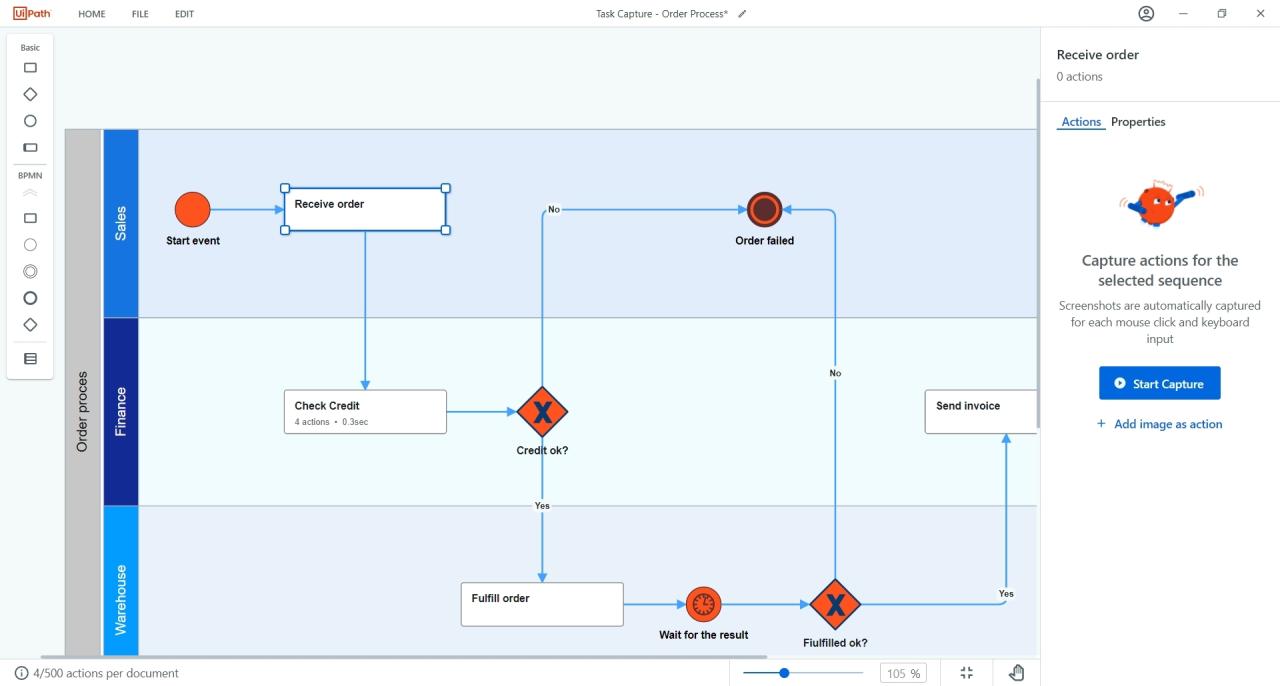 UiPath Task Capture Tools work by capturing and documenting business processes in a streamlined and efficient manner. These tools help in creating visual documentation of tasks performed within a process, making it easier to analyze and optimize workflows.
Workflow of UiPath Task Capture Tools
UiPath Task Capture Tools follow a simple process to capture and document business processes effectively:- Launch the Task Capture Tool and start recording the steps involved in the process.
- As you navigate through the process, the tool automatically captures screenshots and records the actions taken.
- Add annotations, comments, and descriptions to provide context to each step recorded.
- Once the process is completed, stop the recording and review the documented steps for accuracy.
- Export the documented process in various formats such as Word, Excel, or UiPath Studio for further analysis and automation.
Efficiency of UiPath Task Capture Tools vs Manual Documentation
Using UiPath Task Capture Tools offers several advantages over manual documentation methods:- Time-saving: The automated recording feature eliminates the need for manual documentation, saving time and effort.
- Accuracy: The tool captures the process steps accurately, reducing the chances of errors in documentation.
- Collaboration: The visual documentation created can be easily shared with team members for review and feedback.
- Standardization: The consistent format of documented processes ensures clarity and uniformity across all workflows.
Integrating UiPath Task Capture Tools into Existing Workflows
Integrating UiPath Task Capture Tools into existing workflows can greatly enhance productivity and efficiency within an organization. By seamlessly incorporating these tools, businesses can streamline their processes and improve overall performance.Benefits of Integration
- Enhanced Automation: Integrating UiPath Task Capture Tools with existing automation systems allows for a more cohesive and automated workflow, reducing manual intervention and human error.
- Improved Collaboration: These tools enable teams to work together more effectively by providing a centralized platform for process documentation and sharing.
- Increased Visibility: By integrating Task Capture Tools, businesses can gain better visibility into their processes, making it easier to identify bottlenecks and areas for improvement.
- Seamless Transition: Implementing these tools smoothly into existing workflows ensures minimal disruption and allows for a faster adoption rate among users.
Last Word
In conclusion, UiPath Task Capture Tools provide a powerful solution for businesses looking to optimize their process discovery. By integrating these tools seamlessly into existing workflows, companies can unlock new levels of productivity and success.
FAQ Insights
How can UiPath Task Capture Tools benefit my business?
UiPath Task Capture Tools streamline the process discovery phase, leading to improved operational efficiency and productivity.
Can UiPath Task Capture Tools be integrated with existing systems?
Yes, UiPath Task Capture Tools can be seamlessly integrated with other automation or workflow systems for enhanced efficiency.
What industries commonly use UiPath Task Capture Tools?
Industries such as finance, healthcare, and manufacturing often leverage UiPath Task Capture Tools for streamlined business process discovery.