


Delving into UiPath Task Capture: The Essential Bridge Between Business and Developers, this introduction immerses readers in a unique and compelling narrative. It provides a comprehensive overview of how Task Capture acts as a crucial link between business users and developers, fostering seamless communication and collaboration.
Exploring the key features and benefits of Task Capture, this introduction sets the stage for a deep dive into its functionalities and advantages in streamlining automation processes.
Introduction to UiPath Task Capture
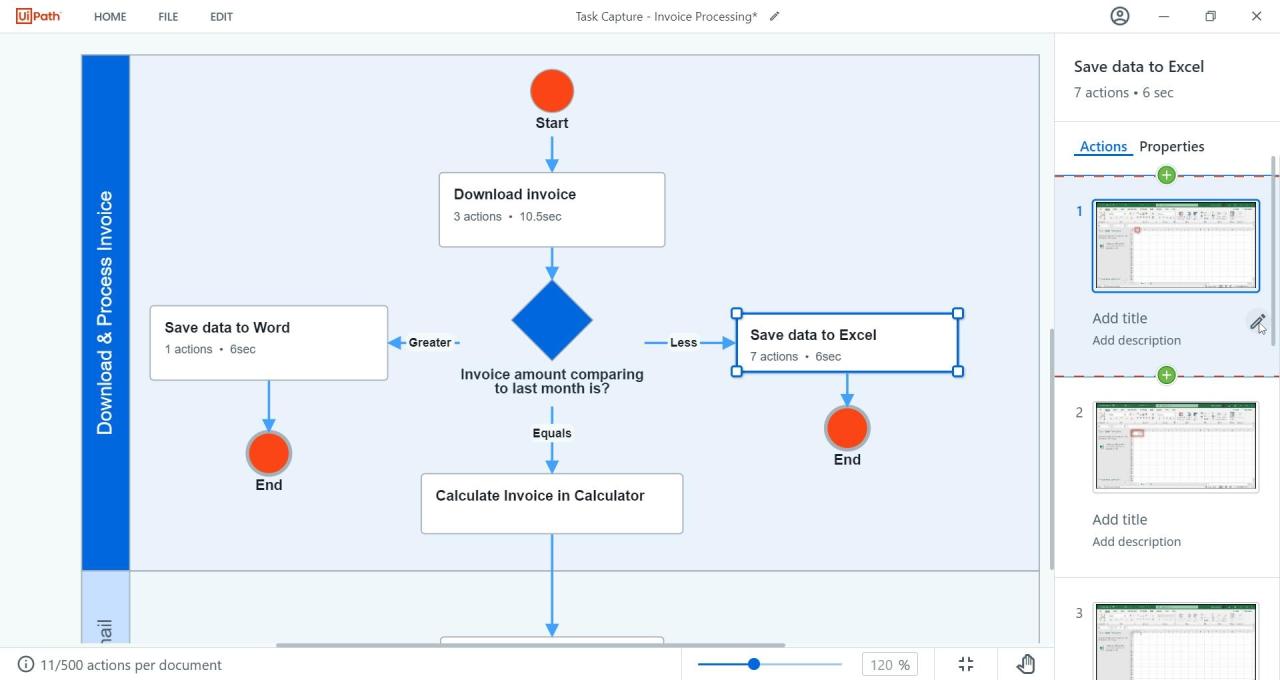 UiPath Task Capture is a powerful tool designed to streamline communication between business users and developers by capturing detailed processes in a simple way. By creating visual documentation of tasks, Task Capture acts as a bridge that ensures a clear understanding of requirements and expectations.
Bridging the Gap
UiPath Task Capture plays a crucial role in bridging the gap between business users and developers by providing a visual representation of workflows. Business users can easily create step-by-step guides of their processes, including screenshots, annotations, and descriptions. Developers, on the other hand, can use this detailed documentation to accurately translate business requirements into automated workflows.- Task Capture allows business users to capture processes directly from their desktop, eliminating the need for lengthy written documentation.
- Developers can access the captured tasks and seamlessly import them into UiPath Studio, ensuring a smooth transition from business requirements to automation.
- Task Capture promotes collaboration and understanding between different teams by providing a visual representation of processes that is easy to follow and interpret.
Features of UiPath Task Capture
UiPath Task Capture offers several key features that make it an essential tool for documenting processes and preparing for automation.Process Documentation
UiPath Task Capture allows users to easily document processes step-by-step, capturing every action and decision made throughout the workflow. This detailed documentation serves as a valuable reference point for understanding the current process and identifying areas for improvement.- Users can record mouse clicks, keyboard inputs, and application interactions to create a comprehensive record of each task within a process.
- Task Capture automatically generates screenshots and annotations to provide visual context for each step, making it easier to follow and understand the documented process.
- Collaboration features enable team members to review and provide feedback on the documented process, ensuring accuracy and completeness.
Automation Preparation
Task Capture plays a crucial role in preparing processes for automation by creating detailed documentation that can be used as a blueprint for building automation workflows.- By capturing detailed process steps, Task Capture helps developers understand the logic and sequence of tasks involved, making it easier to translate manual processes into automated workflows.
- Process documentation generated by Task Capture can be directly imported into UiPath Studio, saving time and effort in recreating the process steps during automation development.
- Task Capture facilitates the identification of repetitive and rule-based tasks that are ideal candidates for automation, streamlining the automation design process.
Benefits of Using UiPath Task Capture
UiPath Task Capture offers a multitude of advantages when it comes to enhancing business processes and streamlining automation development. Let's delve into the key benefits of utilizing Task Capture below.Efficiency in Process Documentation
- Task Capture simplifies the documentation process by capturing every step of a task in a visual format, making it easier for both business users and developers to understand the workflow.
- It eliminates the need for manual documentation, saving time and reducing the likelihood of errors in the process.
Seamless Automation Development
- With Task Capture, businesses can bridge the gap between business users and developers by providing a clear and detailed overview of the tasks that need to be automated.
- Developers can use the documented processes to create automation workflows efficiently, resulting in quicker implementation and reduced development time.
Time and Cost Savings
- By automating the process of task documentation, Task Capture significantly reduces the time and effort required to gather and document requirements for automation projects.
- Reduced development time leads to cost savings for businesses, as automation projects can be completed more efficiently and effectively.
Implementation of UiPath Task Capture
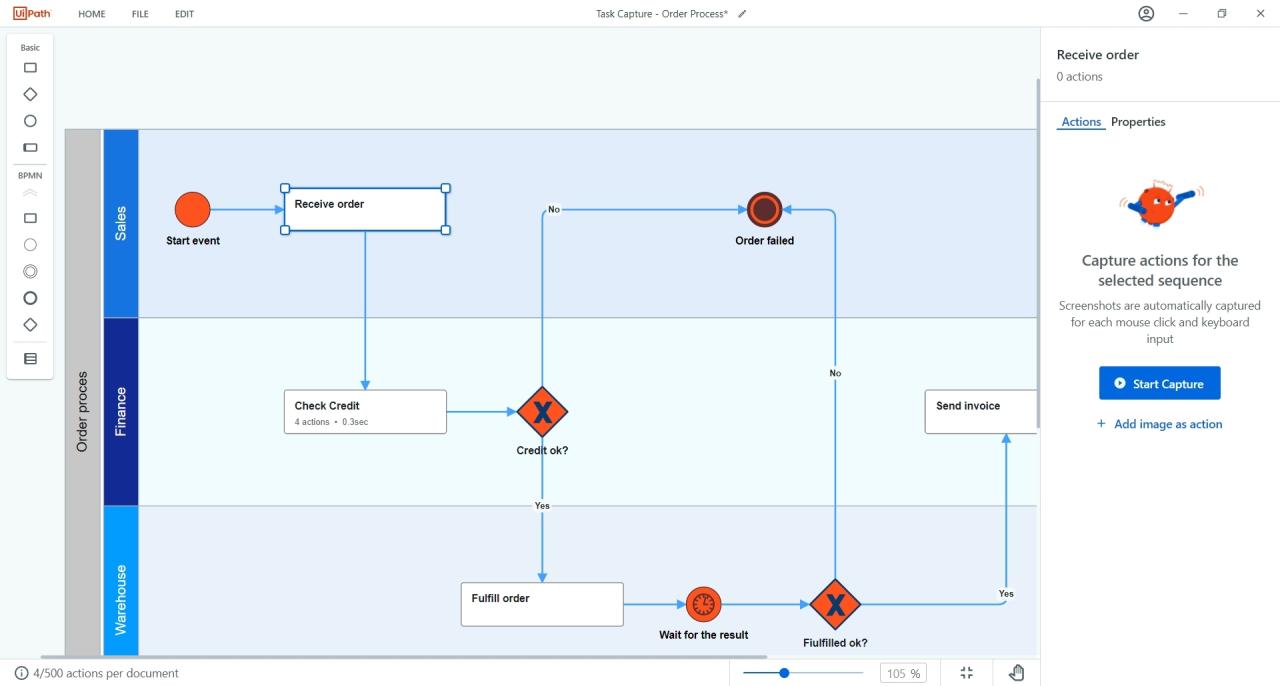
Implementing UiPath Task Capture in a business setting is crucial for streamlining processes and enhancing productivity. Follow this step-by-step guide to effectively integrate Task Capture into your workflows.
Step-by-Step Guide
- Install UiPath Task Capture on the desired machine.
- Launch the application and create a new project.
- Start recording your tasks by capturing screenshots and adding descriptions.
- Organize the captured tasks into sequences to create a comprehensive workflow.
- Collaborate with team members to review and optimize the recorded tasks.
- Export the finalized workflow for use in UiPath Studio.
Best Practices for Using Task Capture
- Involve key stakeholders from different departments to ensure comprehensive task documentation.
- Regularly update and review recorded tasks to reflect any process changes or improvements.
- Provide detailed descriptions and annotations for each task to enhance clarity and understanding.
- Utilize Task Capture as a training tool for new employees to familiarize them with existing workflows.
Tips for Integration into Existing Workflows
- Identify repetitive tasks that can be automated using Task Capture recordings.
- Integrate Task Capture outputs seamlessly into UiPath Studio for quick automation development.
- Create a standardized process for documenting and utilizing Task Capture recordings across teams.
- Continuously seek feedback and suggestions from users to optimize the integration process.
Final Review
In conclusion, UiPath Task Capture emerges as a game-changer in the realm of business process automation, revolutionizing how organizations bridge the gap between business requirements and technical implementation. It is a powerful tool that not only enhances efficiency but also drives innovation and collaboration across teams.
Essential FAQs
How does UiPath Task Capture facilitate communication between different teams?
Task Capture acts as a centralized platform where business users can visually document processes, providing developers with clear insights into project requirements and enabling effective collaboration.
What are the time and cost-saving benefits of utilizing Task Capture?
By streamlining the process of automation development and documentation, Task Capture significantly reduces the time and resources required for project implementation, leading to cost savings and increased efficiency.